
Search has fundamentally changed. Google now shows answers directly on the results page before any website links appear. Featured snippets and zero-click searches shape how people find your content today. Whether you work with an SEO team or do it yourself, learning how these work helps you get more visitors and stay ahead of others.
Search users want quick answers without clicking through pages. Google learned this and built search around instant answers. If you don’t optimize for these SERP features, you lose out. Your competitors will show up first instead of you. Search has changed fast, and many businesses are struggling to catch up.
Understanding Featured Snippets and Zero-Click Searches
This guide shows you how to succeed with featured snippets and zero-click searches using proven strategies. Whether you’re a content creator, marketer, or business owner, it can help you gain an edge in search results. Covering everything from basics to advanced tactics, it shows you why these features matter and how to get Google to select your content.
What Are Featured Snippets?
Featured snippets sit at the very top of Google results. It’s called position zero. Google picks the best answer from a webpage and shows it in a special box. It appears before the regular search results.
The answer can be text, a list, a table, or numbers. Google uses whatever format answers the question best. Think of it like Google reading your page and pulling out the perfect answer to show searchers.
Regular search results just show links whereas snippets show actual answers. Google takes content from pages ranked in the top 10. Not every search gets a snippet. Google only shows snippets decides based on what searchers need.
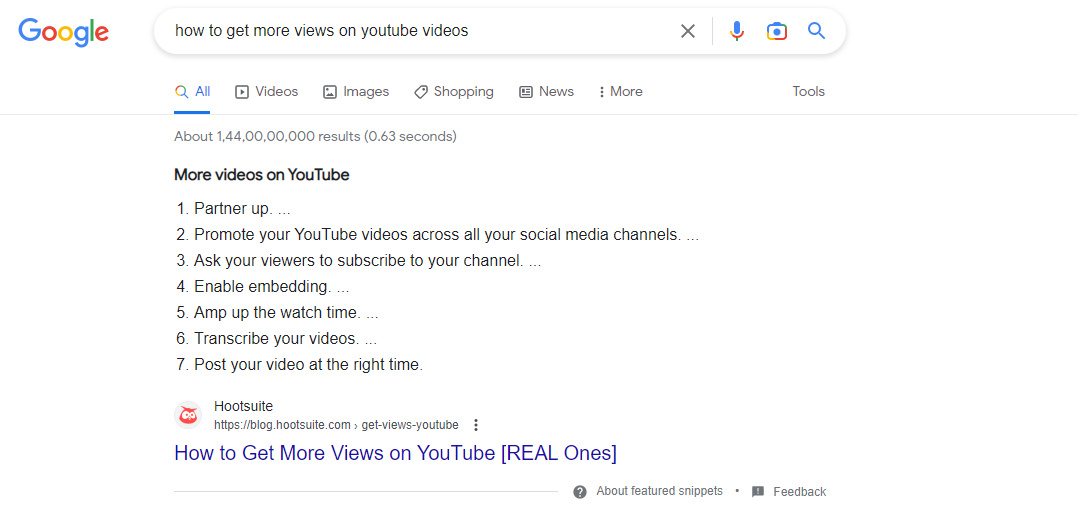
Types of Featured Snippets
Google shows four types of position zero results:
- Paragraph snippets: Text blocks for “what,” “who,” or “why” questions (40-60 words). Example: A search for “what is SEO” gets a paragraph snippet explaining search engine optimization in simple terms.
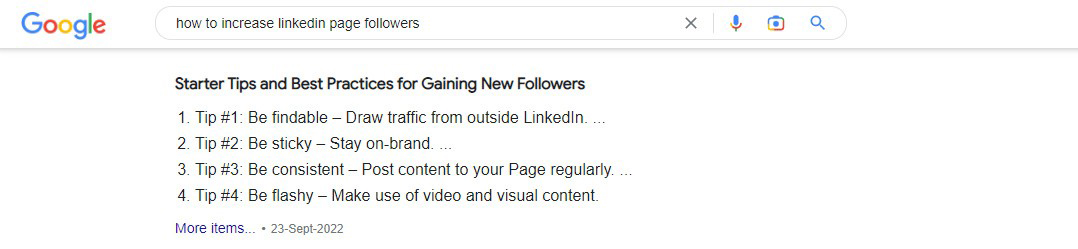
- List snippets: Numbered or bulleted lists for “how-to” or comparison questions. Example: “Steps to make homemade pasta” shows numbered steps 1-7 in a snippet.
- Table snippets: Data shown in rows and columns for comparisons. Example: “Compare iPhone and Android” shows specs side-by-side in a table format.
- Video snippets: Videos that answer “how-to” or demo questions. Example: A search for “how to tie a tie” shows a video at the top.
Choosing the right format is essential for better rankings, as each type suits different search intents. A ‘how-to’ performs best as a list, a comparison fits well in a table, and a definition works best as text.
The Rise of Zero-Click Searches
Zero-click searches occur when users get the information they need directly on Google’s results page—no website visit required. This shift has fundamentally changed how SEO works.
The trend accelerated around 2019, when studies showed that nearly half of Google searches resulted in zero clicks. Today, estimates suggest that about 65% of searches worldwide end without a click. On mobile devices, that number rises to about 75%, while zero-click rates hover around 58–60% in the U.S. and Europe. And the trend continues to grow each year.
People want fast answers. They type a question and want the answer immediately, not after clicking a link. Google built its system around this need. A person searching “how tall is Eiffel Tower” gets the answer (1,083 feet) without clicking a link. A search for “when does Amazon Prime Day start” shows the dates right on Google.
Voice assistants made things harder for traditional clicks. When someone asks Alexa a question, it reads a snippet aloud. No website visit happens. When Google Home answers the question, “what’s the weather tomorrow,” it pulls from snippets. Users don’t need to click a link.
Mobile devices speeded this shift. Smaller screens discourage users from opening full websites, pushing them to look for quick answers instead. Google recognized this behavior and expanded the use of featured snippets and rich results in mobile search to deliver information instantly.
Why Featured Snippets Matter for Your Business
Even with zero-click searches growing, featured snippets still deliver value. Here’s how:
- Your brand shows at the top: Users see your name and answer first. This builds trust and recognition. They remember you even if they don’t click. If someone searches “best coffee brands” and your brand appears in the snippet, they think of you as an expert.
- Google endorses you: When Google picks your answer for a snippet, it says you’re the best source. This makes searchers trust you more. You become the expert they think of. Google doesn’t pick random websites. It picks pages that are accurate, well-written, and match what users want.
- Voice search wins: Alexa, Google Home, and Siri read snippets aloud. Win a snippet and you’re the voice answer users hear. When someone asks “what’s the best running shoe,” if your page shows in the snippet, your brand gets mentioned out loud in their home.
- You still get traffic: Snippets can reduce clicks on that one search. But research shows pages with snippets get way more traffic overall. Pages with snippets see 516% more traffic than pages without them. This happens because of brand visibility and trust. People see your snippet, trust you, and come back later to buy.
- Related questions help: Google shows related questions near snippets 64.9% of the time. These are called “People Also Ask” boxes. They lead users deeper into your site. If someone sees your snippet and clicks a related question, they might click your site from that too.
- Authority builds faster: Snippets make you look like an authority, which builds trust with customers and attracts links from other websites. As a result, search engines rank you higher over time, and competitors notice your strong presence.
Real-World Impact: How Snippets Drive Results
A medical clinic writes about type 2 diabetes signs. They format it as a clean list: increased thirst, frequent urination, fatigue, blurred vision. Google picks it for position zero. Many people get their answer on Google. But some click to read more. They find full details about tests, treatment options, and prevention methods. The snippet became a door to their site. Some of those visitors become patients.
Here’s another example. An e-commerce store sells running shoes. They write a guide: “How to pick running shoes by foot type.” They use a table showing flat feet, normal arches, and high arches with shoe recommendations for each. Google shows this as a table snippet. Shoppers see the right shoe type for them. Many click to buy those shoes from the store. The snippet drove sales.
This works for any business. A software company shows the best tools in a table. An online store explains shoe sizing in steps. They all become the go-to answer on Google.
How to Optimize for Featured Snippets
- Research and Find Snippet Chances
Use tools like SEMrush and Google Search Console. See which keywords show snippets. Look for questions people ask: definitions, how-tos, lists, and comparisons. You can also use Ahrefs, Ubersuggest, or Moz to find snippet opportunities.
Start by searching your main keywords on Google. Do snippets show up? If yes, study them. See what format works (list, table, text, video). Study the snippet length. Count how many words. Use that as your target length.
Check the “People Also Ask” box on Google. Click each question to see related searches. These questions often get snippets. Write answers to these questions. If “what is SEO” gets a snippet, then “why is SEO important” and “how does SEO work” probably do too.
Target long-tail keywords with 300 to 1,000 monthly searches. These keywords have less competition. Your answer can rank faster. Research shows how to optimize website for featured snippets works better than broad terms. A long-tail keyword like “best running shoes for flat feet” is easier to rank for than “best running shoes.”
- Structure Your Content Right
- Use clear headings: Put your question as a heading near the top. Follow it with a short, direct answer. Don’t hide your answer deep in the text. Google likes when answers come early. Use H2 or H3 headings for snippet sections.
- Answer first: Put your snippet answer in the first 100 words of that section. For text snippets, write 40-60 words. For lists, use 5-8 bullet points or numbers. For tables, keep rows under 10 and columns under 5. Google’s algorithm looks for these patterns.
- Format matters: If you want a list snippet, use actual list formatting in HTML.
 tags for numbers. If you want a table, use table code
  . Google reads this code and picks the best format. Don’t just type a list in text. Google won’t recognize it as a list.
 - Add images: Include pictures or charts near your answer. Google shows these in visual snippets. They make your answer stand out. For example, if you write “steps to change a tire,” add a photo of each step. Google might show your images in the snippet.
- Use short paragraphs: Restrict paragraphs to no more than 2-3 sentences. Google likes short, scannable text. Users on phones especially like this. Short text loads faster and reads better on small screens.
Google wants clean, simple content. Here’s how to set it up:
 tags for numbers. If you want a table, use table code
  . Google reads this code and picks the best format. Don’t just type a list in text. Google won’t recognize it as a list.
- Use Schema Markup
- FAQPage schema: For questions and answers. Use this if you have multiple Q&A sections on one page.
- HowTo schema: For step-by-step guides. Tell Google the steps, images, and time needed.
Table schema: For data tables. This helps Google understand rows and columns. - Article schema: For news and articles. Tell Google the headline, author, and publish date.
Schema is code that tells Google what your content means. It helps Google pick your answer for snippets. Think of it like giving Google a map of your content.
Here’s an example. if you write “5 steps to start a blog,” add HowTo schema. Tell Google that step one is choosing a platform, step two is selecting a domain, and so on. This helps Google understand that your content is a how-to guide, increasing the chances of it appearing as a featured snippet for searches like “how to start a blog.
Test your code with Google’s Rich Results tool. Make sure it’s correct. Broken schema won’t help, and invalid code can hurt your rankings.
- Mobile and Voice Search Optimization
Three-quarters of zero-click searches happen on phones. Make your snippets work on small screens. Your answer should show without scrolling. Test on a real phone, not just a desktop screen. What looks good on a computer might look bad on a phone.
Also write for voice search. Use simple words and short phrases. Pretend you’re talking to a friend. Voice search users talk differently than they type. They say “what are the best Italian restaurants near me” instead of typing “best Italian restaurants.”
- Keep Your Answer Fresh
Google tracks how old your content is. Fresh content ranks better for snippets. Update your content every three months with new stats or examples. If your snippet mentions “2024 data,” make sure it’s actually 2024 data. Outdated numbers can hurt your ranking.
Add new examples as things change. If you write about “trending marketing strategies,” update it on a quarterly basis by adding new trends. Be sure to remove old ones. Let Google see that you care about accuracy.
Following best practices for zero-click search optimization help your pages rank for featured snippets in different kinds of searches. They also give your content a better chance of showing up in AI search results.
Boost Visibility: Work with Professional SEO Services
Professional SEO companies know how to implement snippet strategies. They study what your competitors rank for. They find snippet chances you can win. They write content Google likes. They watch your rankings and keep them strong. They also use snippets as part of a bigger plan, not just a standalone tactic.
A reliable search engine optimization company focuses on optimizing your whole website, not just one page. They build a strategy that gets you ahead of the competition. They analyze which keywords get snippets and identify gaps your content can fill.
The best professional SEO services focus on users first. Snippets are a bonus, not the main goal. They write content people actually want to read and make sure it answers questions completely. Then they optimize for snippets as an added benefit.
Get Clicks While You Have Snippets
You want both the snippet and the click, and here’s how to get them.
- Give some, hold back some: Show enough in the snippet to help people but save the best details for your full page. This keeps people clicking. If your snippet answers 70% of the question, users click to get the remaining 30%.
- Offer value: Put case studies, photos, and tips right after your snippet answer. When people click, they should find real value right away, without scrolling or searching. Put your most valuable information at the top of the page, directly below the snippet-focused section.
- Link to other pages: Link from your snippet section to related pages on your site. This pulls readers deeper. If someone clicks your snippet answer and finds links to related topics, they’ll likely explore more of your site.
A fitness site targets “best exercises for lower back pain.” Their snippet lists the top four moves: cat-cow stretch, child’s pose, pelvic tilts, and superman holds. Below that snippet answer, they show videos of each move. They add stories from real clients who fixed their back pain. They offer a free guide to download. They link to “stretches for neck pain” and “core strengthening workout.” People who click find tons of value. Many stay on the site for 10+ minutes.
A recipe site writes “How to make chocolate chip cookies.” Their snippet shows the ingredient list and basic steps. Below that, they add photos of each step. They tell the story of why this recipe is special. They link to “best chocolate chip brands” and “cookie storage tips.” Users who click stay and read multiple pages.
Other Google Results That Stop Clicks
Snippets aren’t the only feature that stops clicks. Other SERP features include:
- Knowledge Panels: These show on the right side for brands and famous people. They pull details from Google Business, Wikipedia, and other relevant sources. Update your Google Business page to control what shows. Add photos, hours, reviews, and links. Strong panels attract more visitors and phone calls, so keep your Google Business page updated.
- Local listings: Maps with business info, reviews, and photos. Key for “near me” searches. A search for “pizza near me” shows local pizza shops with ratings and hours. If your business shows here with great reviews, you get calls and visits.
- Image and video grids: Photos and videos answer questions without text. A search for “how to cut hair” shows video results. A search for “modern kitchen designs” shows image results. These stop clicks because users see what they want without visiting websites.
- AI Overviews: Google now writes its own summaries of answers by pulling from multiple websites into one answer. This has reduced snippets by 35% since late 2024. Now snippets show on about 12% of searches instead of higher percentages before. But this doesn’t mean snippets are dead. You still need to optimize for them because Google continues to show snippets in many searches.
The search world is changing, so stay ready. Monitor how your rankings change, test new formats, and learn from data.
Keep Your Snippets Fresh
Getting a snippet is just the start because Google reviews your content all the time. Here’s how to keep your ranking:
- Update your content every three months with new info and stats
- Check your snippets every month using Google Search Console
- Add new examples and case studies as things change
- Make your content better as your industry grows
- Get good links pointing to your page from other websites
- Fix broken links and outdated information
Sites with strong links and fresh content keep their snippets longer. Their snippets stay in place longer with less ranking movement.
Set a calendar reminder to open Search Console each month and check if your snippets are still showing. If one drops, fix it. Update the content, add new information, and retest the format.
What to Measure
Track these numbers to see how you’re doing:
- Position zero: How many times does Google show your snippet? This is called impressions.
- Click rate: What percent of snippet views lead to clicks? If your snippet shows 1,000 times but gets only 50 clicks, your CTR is 5%.
- Your rank: Do you stay at position zero or move around? Some days you’re number one, some days number three?
- Traffic: Are these pages bringing real visitors? Use Google Analytics to check traffic.
- Bounce rate: Do visitors stay on your page or leave right away? High bounce means your full page doesn’t match the snippet promise.
- Time on page: Do people read your content or just skim it?
- Conversion rate: Do visitors become customers, subscribers, or leads?
Don’t aim for snippets that don’t bring clicks. Focus on snippets that bring real traffic and real results. A snippet that looks impressive but brings zero traffic wastes your time.
Staying Ahead in Zero‑Click Search
Featured snippets and zero-click searches are here to stay. They’re growing fast because search is now about answers, not links. The trick is balancing what helps Google with what helps your users. Write content that answers questions completely and format it for Google. Make sure it works on phones so users can find value easily across any business type.
Brands that master snippets will win in search. You can win at snippets by working with a skilled search engine optimization company. Experts will ensure your content aligns with how Google now delivers answers. They identify keywords that trigger featured snippets and zero-click results, structure content to match search intent, and apply schema markup so Google can clearly understand and feature your pages. SEO experts also optimize on-page layout to show value immediately, monitor performance as SERP features evolve, and continuously refine strategies to keep your visibility strong—even when clicks are no longer guaranteed.
Make zero-click searches work for your brand with expert SEO services.