
Have you’ve ever launched a website and wondered why it isn’t showing up on Google? Many businesses face the same issue—great content, beautiful design, but no visibility. That’s where smart optimization by a professional SEO Company can make all the difference. Search engine experts will implement the right tactics to improve your website’s traffic and indexing by optimizing its structure, content, and backlinks, making it more visible and accessible to Google and other search engines.
According to a 2025 report from Digital Silk, more than 53% of all website traffic comes from organic search, proving that SEO is still the most powerful channel for visibility and engagement. Interestingly, the top result on Google gets about 27.6% of all clicks, while just 0.63% of users go beyond the first page. Clearly, ranking high and getting your site indexed by Google is crucial for attracting traffic and improving website visibility in search engines.
There are two ways to get your website indexed by search engines like Google and Bing:
- The tortoise approach—waiting for it to happen naturally (which takes time).
- The proactive approach—investing in an SEO company to improve website crawlability, conversion rates, and content promotion. Professional SEO services can help ensure that all important pages on your site are visible and easily found by Google bots
Why Should Google Index Your Website?
For your website to appear in search results, it first needs to be indexed by Google. Google’s crawlers, also known as spiders, constantly scan the web for new or updated content. When they find your site, they collect data to determine what your pages are about.
If these spiders can’t detect your pages, your content won’t show up in search results. Simply put, indexing is the process of storing and organizing data gathered during crawling. Frequent indexing improves your search visibility.
Google only adds pages with high-quality, original content and avoids those with unethical practices such as keyword stuffing or spammy backlinks.
SEO indexing services play a key role in helping your site get discovered faster and appear more prominently in search results. These services ensure that your web pages are properly crawled, indexed, and updated whenever you publish new content or make changes. By identifying and resolving technical issues such as crawl errors, broken links, or duplicate content, indexing services improve your site’s accessibility to search engines. As a result, your website gains better visibility, attracts more organic traffic, and stands a stronger chance of ranking higher for relevant searches.
Wondering how to get your website indexed on Google fast? The key lies in optimizing every technical and content element to make your website crawler-friendly and authoritative. That’s exactly how SEO experts help fix Google indexing issues effectively and sustainably.
How to Get Your Website Indexed on Google Fast
When you publish a new post or page, you want Google to know that you have added something, and you want the search engine spider to crawl and index your page or website. Here key steps and strategies to speed up Google indexing:
- Include the page in your sitemap: Your sitemap tells Google which pages are important and how often they should be crawled. Even though Google can find pages independently, including them in your sitemap improves indexing speed.
Use the URL inspection tool in Search Console to see if a page is in your sitemap. It’s not on your sitemap or indexed if you get the “URL is not on Google” error and “Sitemap: N/A.” If you want to find all the crawlable and indexable pages that are not in your sitemap, then run a crawl in Ahref’s Site Audit. You can go to Page Explorer and use the filter shown below:
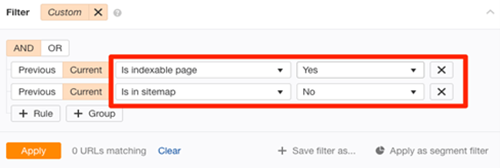
Image Source:
- Submit your XML sitemap to Google: These pages should be in your sitemap, so add them. Then make sure Google can easily crawl and understand your site. Submit your XML sitemap through Google Search Console, which helps search engines discover new and updated pages more quickly. To let Google know that you’ve updated your sitemap, ping this URL:
http://www.google.com/ping?sitemap=http://yourwebsite.com/sitemap_url.xml
- Verify whether any of your pages is orphaned: Orphan pages are ones that have no internal links to them. Because Google discovers new information by crawling the web, orphan pages cannot be discovered in this way. Visitors to the website won’t be able to find them either. Crawl your site with Ahrefs’ Site Audit tool to look for orphan pages.
Next, look for “Orphan page (has no inbound internal links)” errors in the Links report. It shows pages that are indexable and present in your sitemap and have no internal links. If you are not confident about all the pages that you want to be indexed in your sitemap, then follow these steps:
- Download a full list of pages on your site (via your CMS)
- Crawl your website (using a tool like Ahrefs’ Site Audit)
- Cross-reference the two lists of URLs
If any of the URLs were not found during the crawl, then those pages are orphan pages and you can fix them in one of the following two ways:
- If the page is unimportant, delete it and remove from your sitemap
- If the page is important, incorporate it into the internal link structure of your website
- Fix nofollow internal links: Links using the rel=”nofollow” tag are nofollow links. They prevent PageRank from being transferred to the destination URL. Nofollow links are also not crawled by Google. Here’s what Google has to say about it: Essentially, utilizing nofollow causes the target links to be removed from our total web graph. If other sites link to them without employing nofollow, or if the URLs are submitted to Google in a Sitemap, the target pages may still remain in our index.
To summarize, make sure that every single internal link to indexable pages are followed. Crawl your site with Ahrefs’ Site Audit tool to achieve this. Look for indexable pages with “Page has nofollow incoming internal links only” issues in the Links report.
- Include strong and powerful internal links: Crawling your website allows Google to find new content. Strong internal linking plays a key role—linking new pages from existing, indexed content helps Google find them faster. They may not be able to find the page in question if you fail to include an internal link to it. Adding some internal links to the page is a simple solution to this problem. This can be done from any web page that Google can crawl and index.
If you want Google to index the page as quickly as possible, though, you should do so from one of your more “strong” pages because such pages are more likely to be re-crawled by Google than less essential pages. You can do this using Ahref ‘s Site explorer, just type your domain and visit the best by links report. It will show the most authoritative page first, you can check that list and look for relevant pages from which to add internal links to the page in question.
- Ensure that the page is unique and valuable: Make sure to publish high-quality, original content and update your site regularly signals freshness to search engines, encouraging quicker indexing. Google avoids indexing thin or duplicate pages. Review your content and ask:
- Does this page provide real value?
- Would users find it helpful if they discovered it in search results?
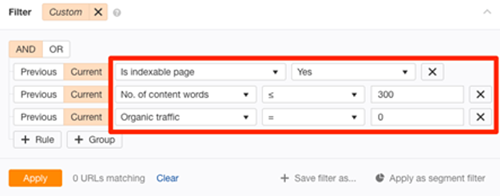
Using Ahrefs’ Site Audit tool and URL Profiler, you can uncover more potentially low-quality pages that aren’t indexed. You can go to Page Explorer in Ahref’s Site Audit to change the settings as shown below:

Image Source:
This will return “thin” pages that are indexable but have little organic traffic at the moment. To put it another way, there’s a good probability they aren’t indexed. After exporting the report, paste all of the URLs into the URL Profiler and check for Google indexation. Check for quality issues on any pages that aren’t indexed. If necessary, make improvements before requesting re-indexing using Google Search Console. You should also try to resolve duplicate content concerns.
- Develop strong backlinks: Backlinks inform Google about the importance of a web page. After all, if others are linking to it, it must be worthwhile. This is a list of pages that Google would like to index. Google does not merely index websites with backlinks for complete transparency. There are a lot of indexed pages (billions) that have no hyperlinks. Since Google considers pages with high-quality links to be more significant, they’re more likely to crawl and re-crawl them faster than pages without such links. As a result, indexing takes less time.
- Improve page load speed and mobile usability: Faster-loading pages and mobile-friendly design make it easier for search engines to crawl your site efficiently and prioritize indexing. Since Google primarily uses mobile-first indexing, optimizing performance and usability can significantly improve crawl frequency and support faster indexation—especially for new or recently updated websites.
Watch out for Errors that Impact Visibility and Crawlability
Common mistakes to watch out for include:
- Crawl blocks in your robots.txt file: Check that important pages aren’t blocked by robots.txt or noindex tags, as these can prevent indexing altogether.
Sometimes your website may not get indexed due to crawl block in robots.txt file. To verify this you must go to yourdomain.com/robots.txt. The following two snippets of code may appear
| 1 | User-agent: Googlebot |
| 2 | Disallow: / |
| 1 | User-agent:* |
| 2 | Disallow: / |
Both of these show that the spiders are not allowed to crawl any pages on your website. You can fix this issue simply by removing them. If Google isn’t indexing any web pages, a crawl block in robots.txt could be the cause. Paste the URL into Google Search Console’s URL inspection tool to see if this is the case.
For more information, click the Coverage block, then look for the “Crawl allowed?”. No: robots.txt has blocked you.” This shows that the page has been blocked by the robots.txt file. If this is the case, examine your robots.txt file for any “disallow” rules that pertain to the page
- Rogue noindex tags: If you don’t want Google to index any page, then you can stop Google from doing so. This can be done in two ways:
- Meta Tag: Any page that has any of the following tags in their section will not get indexed by Google:
1
1
To find all the pages that have “noindex” metatag, you can run a crawl with Ahref’s site audit tool and check for Noindex page warnings. Check the pages that are affected and remove the noindex meta tag. - X- Robots- Tag: This is the second method. The XRobots-Tag HTTP response header is likewise respected by crawlers. This can be done with a server-side programming language like PHP, or by editing your .htaccess file, or modifying your server setup.
The URL inspection tool in Search Console will notify you if this header is preventing Google from crawling a page. Simply input your URL and check the “Indexing allowed?” box. No: ‘noindex’ detected in the ‘XRobots-Tag’ http header”. If you want to check this issue for your entire website, then run Ahref’s Site Audit tool and instruct your developer to exclude pages you want indexing from returning this header.
- Rogue canonical tags: A canonical tag tells Google which version of a page is favored. This is what it looks like
href=”/page.html/”>link rel=”canonical” href=”/page.html/”>
The majority of pages have either no canonical tag, or a self-referencing canonical tag. This informs Google that the page is the preferred and most likely the only version. To put it another way, you’d like this page to be indexed. However, if your page contains a rogue canonical tag, it may inform Google about a preferred version of this page that does not exist. If this is the case, your page will not be indexed.
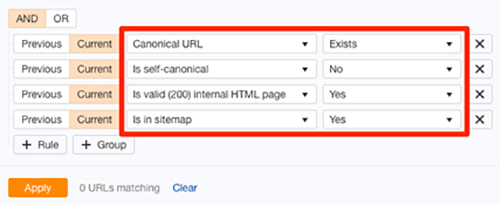
Use Search Console to identify “Alternate page with canonical tag” warnings. If your page references a non-existent URL, remove or fix the tag. An easy method to find rogue canonical tags in your website is to run Ahref’s Site Audit tool. Go to Page Explorer and use the setting as shown below:
- Low quality pages: Having an excessive number of low-quality pages on your website wastes the crawl budget. According to Google, the Crawl budget […] is not something most publishers have to worry about, and also added that “if a site has fewer than a few thousand URLs, it will be crawled efficiently most of the time.” Still, it’s never a bad idea to remove low-quality pages from your website. It can only be beneficial to the crawl budget. You can use our content audit template to identify pages that are potentially low-quality or irrelevant and can be removed.
Getting your website indexed by Google is essential for visibility, traffic, and long-term growth. These steps when applied correctly can make a huge difference in how quickly and effectively your content appears in search results.
Whether you’re a startup, an eCommerce store, or a professional service provider, working with an experienced SEO company can simplify the technical process and maximize your reach. A skilled SEO team can handle everything, from fixing crawl issues and optimizing sitemaps to improving internal linking and backlinks, so your website earns the visibility it deserves.